You’ve been handed a Salesforce FSC claims implementation. You open the data model documentation and see 24 objects staring back at you. You’ve been told there are three intake channels. The business wants to go live in 12 weeks.
Most developers do the same thing next: open Setup and start building.
That’s the mistake.
The object model decisions you make in week one are the hardest to reverse in production. Not because Salesforce makes it technically impossible — but because by the time you realise the design is wrong, you have data in it, flows built on top of it, and a business that has trained its adjusters on it.
This post isn’t a walkthrough of every FSC claims object. Salesforce documents those well enough. This is the thought process — five questions you should answer before you touch Setup, in the order they actually matter.
Question 1: Where Can a Claim Enter Your System?
Before you think about objects, draw your intake channels. Every single one.
In most FSC claims implementations, a claim can enter through:
– A web portal (Experience Cloud self-service FNOL)
– A phone call (agent manually enters FNOL in Service Console)
– A third-party system via middleware (automated FNOL submission)
– Email-to-Case (less common but it happens)
Each channel captures different data at intake. A web FNOL might collect policy number, incident date, incident description, contact details, and supporting documents — all before the record is created in Salesforce. A phone FNOL might give you a name, a phone number, and a rough description of what happened. That’s it.
The universal rule: design for your most incomplete intake channel, not your most complete one.
If phone intake only reliably captures 4 fields, no field on Case or Claim can be required that phone doesn’t provide. If you design your required fields around the web portal — which captures everything — your phone intake process will break, your agents will put placeholder values in required fields, and your data quality will degrade within a month.
Draw the channel map first. List what each channel captures. The intersection of all channels — the fields every intake method can reliably supply — is your required field set. Everything else is optional at intake and completed downstream.
Question 2: What Is a Case vs What Is a Claim?
This is where most implementations make their first permanent mistake, and it happens because the boundary feels obvious until it isn’t.
Business users call everything “the claim.” Developers need to be precise.
Case = the customer interaction container.
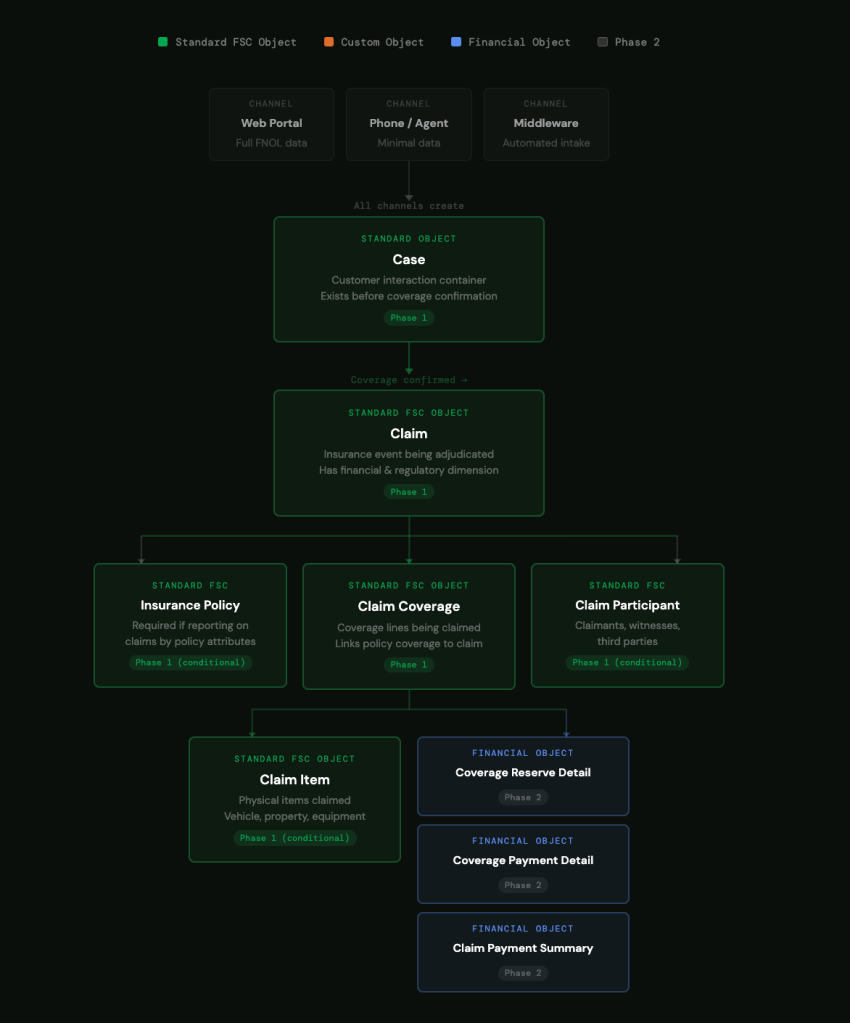
A Case exists from the moment a customer contacts you about an incident — before anyone knows whether a valid claim exists. It holds the FNOL details, the communication history, the customer contact record, and the intake channel metadata. A Case can be opened and closed regardless of whether a Claim is ever created. If someone calls to report an incident that turns out not to be covered, that interaction still happened and still needs to be tracked. That lives on Case.
Claim = the insurance event being adjudicated.
A Claim only exists once coverage has been confirmed and the event is being formally processed. It has a financial dimension — reserves, payments, recoveries. It has a regulatory dimension — response time SLAs, adjuster assignments, compliance tracking. A Claim is a business commitment. A Case is a conversation.
The test for any piece of data: does it exist before coverage confirmation, or after? If before — it belongs on Case. If after — it belongs on Claim.
Why this matters: if you get the boundary wrong, you end up with financial data on Case records or customer interaction history on Claim records. Both create reporting problems that are painful to untangle post-go-live. More importantly, they create process problems — adjusters looking in the wrong place for information, managers pulling reports that mix pre-coverage and post-coverage data.
Before you build anything, sit with your business analyst and walk through every data point the business wants to capture. For each one, ask: does this exist before or after coverage confirmation? Map the answer. That becomes your field placement guide.
Question 3: How Does Your Policy Model Connect?
The Salesforce FSC data model shows a direct relationship between Insurance Policy and Claim. In reality, most implementations are more complicated than that — because the policy usually lives somewhere else.
In most insurance implementations, the policy system of record is an external platform — a legacy policy administration system, a third-party platform, or a core insurance system. Salesforce is the engagement layer, not the policy ledger.
This creates a design decision with long-term consequences: Do you replicate the policy in Salesforce as an Insurance Policy object, or do you store the policy number as a reference field on Claim and retrieve policy details via integration when needed?
The answer depends on one question: do you need to report on claims by policy attributes?
If your business needs reports like “all claims against policies with liability coverage over £500k” or “claims by policy type by quarter” — you need the Insurance Policy object in Salesforce with the relevant attributes populated. You cannot report across a relationship that only exists as a text field.
If you only need the policy number to look up details in an external system when an adjuster needs them — a text field on Claim is sufficient, cheaper to maintain, and avoids the synchronisation complexity of keeping a replicated policy record current.
The generic rule: reporting requirements drive the policy model decision, not the data model diagram. Talk to your reporting stakeholders before you decide. Changing from a text field to a full Insurance Policy object relationship after go-live means data migration, not just a schema change.
Question 4: Which of the 24 Objects Do You Actually Need in Phase 1?
The full FSC Insurance Claims data model contains 24 objects. No implementation needs all 24 on day one. Trying to implement all of them in Phase 1 is the fastest route to a delayed go-live and a confused business.
Here is how to think about the object set by phase:
Always needed from day one:
– Case — your intake container. Non-negotiable.
– Claim — the core insurance event. Non-negotiable.
– Claim Coverage — tracks what’s covered under the claim. Required if you’re processing any coverage-level decisions, which you almost certainly are.
Needed in Phase 1 if your business requires it:
– Insurance Policy— needed if you’re reporting on claims by policy attributes (see Question 3).
– Claim Participant — needed if you track claimants, witnesses, and third parties as separate records rather than as contacts on the Case. If your adjusters need to manage multiple parties per claim, this is Phase 1. If not, it can wait.
– Claim Item — needed if you’re tracking physical items being claimed — vehicles, property, equipment. If your claims are purely liability or medical, this can be Phase 2.
Phase 2 unless you have immediate financial reporting requirements:
– Claim Coverage Reserve Detail
– Claim Coverage Reserve Adjustment
– Claim Coverage Payment Detail
– Claim Coverage Payment Adjustment
– Claim Payment Summary
– Claim Recovery
These objects support financial tracking and reconciliation. They’re important — but they require stable upstream processes before they’re useful. If adjusters aren’t consistently completing Claims correctly yet, adding financial tracking objects in Phase 1 creates complexity without value.
The Phase 1 filter: walk through every object and ask “will an adjuster interact with this in their first 30 days?” If the answer is no, it’s Phase 2. Keep Phase 1 to what adjusters actually use. Add financial and analytical objects once the core process is stable.
Question 5: How Will Adjusters Track and Progress Their Work?
The data model tells you how to store claim information. It doesn’t tell you how adjusters actually move a claim forward day-to-day — requesting documents, scheduling inspections, getting internal sign-offs, coordinating with third parties. That’s a separate design decision, and it’s one most developers leave too late.
There are three generic approaches. Each has a different cost and capability profile.
Option 1: Standard Activities (Tasks and Events)
Use Salesforce Tasks related to Claim records. Every adjuster action becomes a Task — request document, call claimant, escalate for approval. This is the lowest-effort approach. No custom objects, no extra build, and adjusters already know how Tasks work.
The limitation: Tasks are flat. You can’t easily model a sequence of dependent actions, enforce a specific order of operations, or track SLA compliance per action type. If your claims process is relatively straightforward and your business doesn’t have complex regulatory reporting on adjuster activity, Tasks are sufficient and you shouldn’t over-engineer it.
Option 2: A Custom Action Tracking Object
Build a purpose-specific object — call it whatever fits your business language: Claim Action, Claim Task, Claim Activity. Full control over status lifecycle, action types, assignment logic, SLA fields, and reporting. The right choice when your business has regulatory requirements around response times, needs to track actions at the coverage line level rather than the whole claim, or has complex approval chains.
The cost: you’re building and maintaining a custom object. That means trigger considerations, flow design, page layout decisions, and reporting setup. Do this only when Tasks genuinely can’t meet the requirement — not because it feels more thorough.
The key design question if you go custom: does an action belong to the Claim or to a specific Coverage line? If adjusters can progress work on one coverage line while another is still open — vehicle damage progressing while liability is still under investigation, for example — your action object needs a relationship to Claim Coverage, not just Claim. Getting this wrong means either blocking adjuster progress unnecessarily or losing coverage-level traceability. It’s the one relationship decision you don’t want to revisit after go-live.
Option 3: OmniScript-Driven Process Steps
If your implementation uses OmniStudio, the claims process itself can be modelled as a guided OmniScript — each step in the script represents an adjuster action, with branching logic, integration calls, and data capture built in. The “task tracking” lives inside the script execution rather than as discrete object records.
This works well when the claims process is highly structured and consistent — the same steps in roughly the same order every time. It works less well when adjuster work is unpredictable or when you need ad-hoc actions outside the scripted flow. OmniScript and a custom tracking object are not mutually exclusive — many implementations use OmniScript for the structured process and Tasks or a custom object for the unstructured work alongside it.
How to choose:
Ask your compliance team one question before you decide — “do you need to report on individual adjuster actions against regulatory response time requirements?” If yes, you need a dedicated tracking object with explicit SLA fields. If no, Tasks are probably sufficient, and you can always add structure later if the process matures.
The Checklist: Before You Open Setup
If you take nothing else from this post, answer these five questions first:
1. Have you mapped every intake channel and what data each one reliably captures? Your required fields are the intersection of all channels, not the union.
2. Have you defined the Case vs Claim boundary with your business analyst? Walk through every data point and classify it as pre-coverage or post-coverage. Write it down.
3. Do you need to report on claims by policy attributes? Yes means Insurance Policy object. No means a reference field. Decide before you build.
4. Which objects will adjusters actually use in the first 30 days? That’s your Phase 1 object set. Everything else is Phase 2.
5. Does your compliance team need to report on adjuster actions against regulatory response time requirements? Yes means a dedicated tracking object with SLA fields. No means Tasks are sufficient — don’t over-engineer it.
The object model isn’t the first decision. The channel map is.
Draw every intake channel, list what each one captures, define the Case vs Claim boundary, decide your policy model, and scope your Phase 1 objects — before you open Setup. The data model follows from those decisions. Every developer who skips this step ends up revisiting part of their schema in production, and production schema changes are never as clean as design-time ones.
Build the map. Then build the model.